Tuesday, May 18, 2010

Scalability study of StarCCM+ on cluster

Introduction

Latest version of StarCCM+ starts supporting multi nodes job on POE/IBM/AIX environment. Previously, it was not possible to run StarCCM+ on more than one node in parallel. Therefore, the maximum number of cores is limited to 16 on hydra[1]. But, with StarCCM+ ver 5.02, it became possible to spawn parallel processes on remote compute node through POE parallel environment on IBM cluster. Now, the question is how scalable StarCCM+ is?

Experimental environment

For experiment , lemans_poly_17m.sim file has been tested, which is one of simulation input file frequently used for benchmark. The file size is 6.5GB and it has 17 millions of cells and 95 millions of vertices.
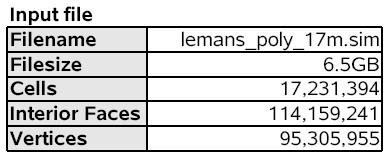


The primary purpose of experiment is to identify how scale StarCCM+ is on hydra, however, the relative performance of two different machines is also evaluated. Each compute node on eos[2] has two quad core Intel X5560 based cluster and each node is connected via Infiniband, whereas, compute node on hydra has 8 dual core Power5+ and HPS is used as a interconnect.


Results

The benchmark results are evaluated from two different perspectives; scalability, relative performance.

Scalability

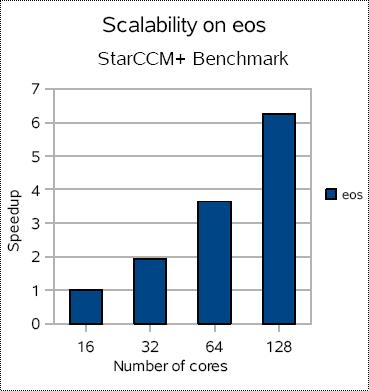
The scalability on eos and hydra shows not much difference each other. The performance with 16 cores is used as a basis for speedup comparison.

On eos, speedup is easily doubled as the number of core increase and it stays very scalable up to 64 cores. With 128 cores(8x), it slows down and shows only 6.2x speedup.


On hydra, it shows very similar result and stays very scalable up to 64 cores and starts slow down around 128 cores.
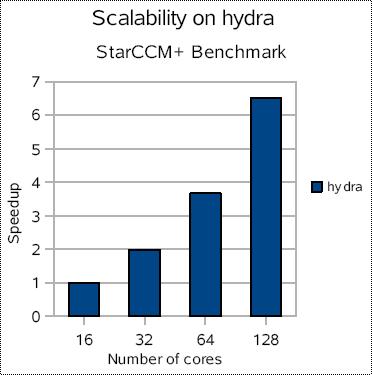


Based on this result, there is no significant difference on the scalability of StarCCM+ on eos and hydra. However, it could be changed with different input files, I/O patterns, and characteristics of data in input file.

Performance

The definition of 'performance' here is, simply, who finish simulation fast. With same input file, how long it take on each machine? The differences between eos and hydra varies as the number of cores increase. eos is about 2.51x faster than hydra on 16 cores and 2.41x faster on 128 cores.


Conclusion


Benchmark results show that eos performs better than hydra to run StarCCM+ with given input file. However, the differences in hardware specification between 2 machines such as L3 cache size, interconnect, number of cores per node, can change the result with different characteristics of input file.

References

1. http://sc.tamu.edu/help/hydra/
2. http://sc.tamu.edu/systems/eos/hardware.php

Thursday, May 13, 2010

Quick install guide for LAMMPS on Linux cluster

This is a quick installation guide for LAMMS 10 May 2010 version for Linux cluster and it can be done within 1 hours if you follow this carefully.

SYSTEM SPECIFICATION

Intel(R) Xeon(R) CPU X5560 @ 2.80GHz
Red Hat Enterprise Linux Server release 5.4 (Tikanga) 2.6.18-164.11.1.el5
Intel compiler and MPI stack
mpiicc for the Intel(R) MPI Library 4.0 for Linux*
Copyright(C) 2003-2010, Intel Corporation. All rights reserved.
Version 11.1

Prerequisites

Download these 2 files and untar them, respectively.

- fftw-2.1.5.tar.gz
http://www.fftw.org/fftw-2.1.5.tar.gz
- lammps.tar.gz (lib for LAMMPS, LAMMPS itself)
http://lammps.sandia.gov/download.html

Instruction

In a nutshell, installation procedure consists of 3 steps; (1)FFTW, (2)libs for LAMMPS, (3)LAMMPS itself. And if you use mpiicc and mpiifort, then you don't have to worry about the PATH of MPI package and it will be taken care of automatically.

(1)FFTW

Even though the latest version of FFTW is 3.2.2, but, unfortunately, LAMMS can not work with it. You better stick to 2.1.5 for now. And I assume you're installing it at /usr/local/fftw-2.1.5 directory.

After uncompressing it,

cd fftw-2.1.5
./configure CC=mpiicc F77=mpiifort --prefix=/usr/local/fftw-2.1.5
make
make check
make install

(2)libs for LAMMPS

After uncompressing lammps.tar.gz,(actually, libs for LAMMPS is part of lammps.tar.gz)

cd lib/reax
Change ifort to mpiifort in Makefile.ifort
make -f Makefile.ifort

cd lib/meam
Change ifort to mpiifort in Makefile.ifort
make -f Makefile.ifort

cd lib/poems
Change icc to mpiicc in Makefile.icc
make -f Makefile.icc

(3)LAMMPS
cd src

Check which packages are included
make package-status

Choose all standard packages to be included
make yes-standard

If you don't have GPU, then exclude gpu package. Otherwise, you will see tons of error message when you compile it.
make no-gpu

Edit MAKE/Makefile.linux

Remove MPI_PATH,MPI_LIB, it will be taken care of by mpiicc, mpiifort
#MPI_PATH =
#MPI_LIB = -lmpich -lpthread

CC=mpiicc
LINK=mpiicc
FFT_INC = -I/usr/local/fftw-2.1.5/include -DFFT_FFTW
FFT_PATH = -L/usr/local/fftw-2.1.5/lib
FFT_LIB = -lfftw

Build LAMMPS as an executable and library as well

make linux
make makelib
make -f Makefile.lib linux

INSTALLATION

I assume you're installing lammps at /usr/local/lammps directory.

copy bench/ doc/ examples/ potentials/ README tools/ to /usr/local/lammps
copy all *.a to /usr/local/lammps/lib
copy lmp_linux to /usr/local/lammps/bin

Done!!!

Once you have gotten this far, just let user know lammps is available at /usr/local/lammps, then they know how to play around it.

Wednesday, March 3, 2010

OpenMP v.s MPI. Who is the winner?

Recently, I have analyzed all the email communication between supercomputer user and helpdesk from 08/2006 to 03/2010. Only OpenMP and MPI related emails are counted.

openmp

This is just for fun and not intended to deliver any technical explanation or anything. Occasionally, some of user ask just out of curiosity, and this is answer to that. That's it.

Wednesday, February 10, 2010

Short course : Introduction to Unix/Linux

For spring semester, we will be offering short course, 'Introduction
to Unix',

Date : Feb 8(Monday) ~10(Wednesday).
Location : Annex library 417C

For detail,

http://groups.google.com/group/tamulinux

Please, leave a comment or feedback about this class. It would be helpful to improve the class.
Thanks you.

Friday, September 25, 2009

New way to manage your account on supercomputer

Recently, I have been developing a web based system to manage account on supercomputer. Previously, user need to connect text terminal based system to create account and change password. To be able to do this, user need to install terminal emulator(Hummingbird - Host Explorer) on their Windows machine first and set it up correctly. The problem here is that a lot of our user are not familiar with these 'text terminal' based system and even the interface is not intuitive at all and user has to go through different authentication process for each systems.

So we have decided to develop a web based system with more intuitive user interface and simple/central authentication process. Once user log in this system, user can create account, change password, and check account balance all in one single place. Now, it is under beta testing.

1. Login to AMS(Account Management System)

1-Login to AMS

2. Centralized Authentication System

2-Centralized Authentication System

3. Account Summary

3-Account Summary

4. Profile

4-Profile

5. Change password

5-Change password

Wednesday, August 19, 2009

PHP class generator

Writing a PHP class file is a huge nightmare if it has 20 member variables or more. Why? Because you have to write set function and get function per each member variable. It's 40 functions. What if you have 30 member variables? hm...

PHP class generator is a solution for that kind of job. It takes the name of class and list of member variables as parameters, then generate PHP class source code automatically.

For example, if you want


class testClass
{
var $test1;
var $test2;

function __construct()
{
}
function setTest1($test1)
{
$this->test1 = $test1;
}
function getTest1()
{
return $this->test1;
}
function setTest2($test2)
{
$this->test2 = $test2;
}
function getTest2()
{
return $this->test2;
}
}
?>


For example, if you want just type

$php genClass.php testClass test1 test2 > testClass.php

then it generates source code you want. Stop writing get/set function manually from now. Here is source code. I hope you enjoy it.


/**
* File : genClass.php
*
* Generate PHP class file with given class name and list of member variables.
*
* @author : Brian @ Texas A&M University
*
* Usage : $php genClass.php className fieldName1 fieldName2 ... > filename
* Example : $php genClass.php testClass test1 test2 > testClass.php
* $cat testClass.php
class testClass
{
var $test1;
var $test2;

function __construct()
{
}
function setTest1($test1)
{
$this->test1 = $test1;
}
function getTest1()
{
return $this->test1;
}
function setTest2($test2)
{
$this->test2 = $test2;
}
function getTest2()
{
return $this->test2;
}
}
?>
*/

if ( $argc == 1 )
{
exit("Useage : genClass.php className fieldName1 fieldName2 ... > filename\n");
}

$name = $argv[1];
$max = $argc-1;

echo "echo "class $name\n";
echo "{\n";

for ( $i = 2 ; $i <= $max ; $i++ )
{
echo " var \$$argv[$i];\n";
}

echo "\n";
echo " function __construct()\n";
echo " {\n";
echo " }\n";
for ( $i = 2 ; $i <= $max ; $i++ )
{
$tmp = ucfirst($argv[$i]);
echo " function set$tmp(\$$argv[$i])\n";
echo " {\n";
echo " \$this->$argv[$i] = \$$argv[$i];\n";
echo " }\n";
echo " function get$tmp()\n";
echo " {\n";
echo " return \$this->$argv[$i];\n";
echo " }\n";

}
echo "}\n";

echo "?>\n";
?>

Monday, June 15, 2009

Rocks cluster 5.2 (beta) & Matlab R2008b on Linux x86_64

Introduction


You will face 3 problems when you install and run Matlab R2008b on Rocks cluster 5.2 (beta). Actually, these issues are not necessary caused by Rocks 5.2 cluster, but, it happened on Rocks on Linux x86_64. So, let's fix them!

1. Installation

It happens when you type 'install' after inserting Matlab DVD into your head node.

bash: /media/MATHWORKS_R2008B/install: /bin/sh: bad interpreter: Permission denied

Solution

The reason is that 'noexec' option is applied internally when it is mounted automatically. Simple fix is that just unmount DVD and mount it again "manually". Then, 'noexec' won't be used by default.

$unmount /cdrom
$mount -t iso9660 /dev/cdrom /cdrom

Reference

http://www.mathworks.com/support/solutions/en/data/1-184PH/

2. Running demo

After installing, you might want to test run demos provided with Matlab. And you would click 'Help/Demo' menu and eventually, will click 'Run this demo' link. But, what you get is not a fancy demo window, but a just frustrating error like this.

Solution

Matlab is not really smart enough to know that you are using Firefox. So we need to let Matlab know that we are using Firefox. How?

Edit this file;

MATLAB_INSTALL_DIR/toolbox/local/docopt.m

In line 52, change this line

doccmd = '';

to

doccmd = 'mozilla';

Reference

http://www.mathworks.com/support/solutions/en/data/1-25NUXQ/

3. Printing

When you click print within Matlab, you would get this error on Linux;

Caused by: java.lang.NullPointerException: null attribute
at sun.print.IPPPrintService.isAttributeValueSupported(IPPPrintService.java:1147)
at sun.print.ServiceDialog$OrientationPanel.updateInfo(ServiceDialog.java:2121)
at sun.print.ServiceDialog$PageSetupPanel.updateInfo(ServiceDialog.java:1263)
at sun.print.ServiceDialog.updatePanels(ServiceDialog.java:437)
at sun.print.ServiceDialog.initPrintDialog(ServiceDialog.java:195)
at sun.print.ServiceDialog.(ServiceDialog.java:124)
at javax.print.ServiceUI.printDialog(ServiceUI.java:188)
at sun.print.RasterPrinterJob.printDialog(RasterPrinterJob.java:855)
at sun.print.PSPrinterJob.printDialog(PSPrinterJob.java:421)

Solution

It is caused by the bugs in Java printing function, which is used by Matlab to print output. There are several workarounds are suggested, but, in my opinion, the easiest and simples way is adding this line;

Option orientation-requested 3

to CUPS's configuration file;

/etc/cups/printers.conf

Reference

http://www.mathworks.com/support/solutions/en/data/1-747TRF/