Showing posts with label intel. Show all posts

Friday, July 20, 2012

Is GPU good for large vector addition?

Introduction

With more than one GPU programming interfaces available, there is a great interest in converting regular program to GPU program with two frequently asked questions.

  1. How much performance improvement can we expect from it?
  2. Which programming interface is better than others?

In this post, the performance of CPU and GPU are compared for vector addition and matrix multiplication, which are widely used building blocks for scientific application.

Additionally, the performance of OpenCL, CUDA, and PGI Accelerator on NVIDIA's M2050GPU are analyzed to compare different GPU programming interfaces.

1. Is GPU faster than CPU?

No - for vector addition

Yes - for matrix multiplication

Figure 1 shows 'elapsed time' for vector addition on CPU and GPU. CPU is about 4 times faster than GPU in this experiment.
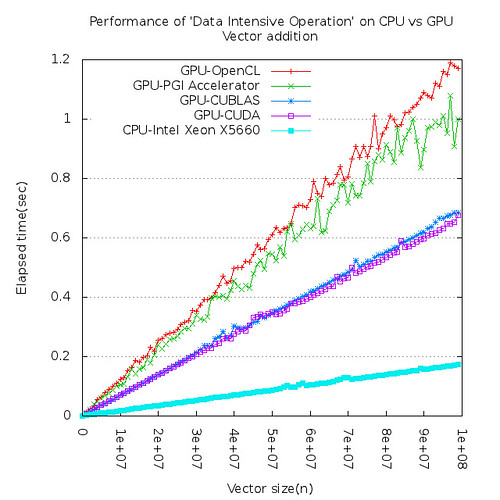


Figure 1. CPU is faster than GPU for vector addition

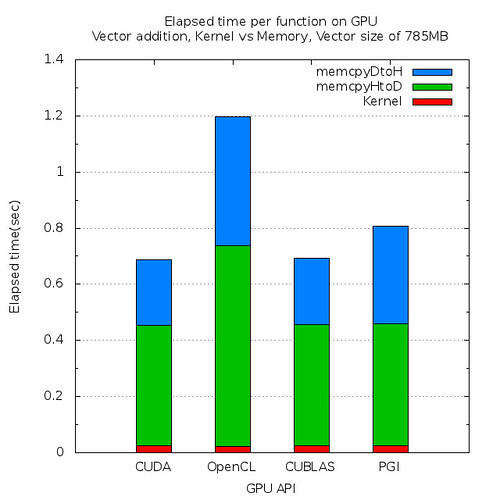
Figure 2. Elapsed time per function on GPU

Large vectors need to be copied from CPU memory to GPU memory through relatively slow PCIe bus and it overshadows the higher computational capability of GPU. Figure 2 tells us that most of time on GPU are used to copy data.

However, for matrix multiplication, GPU is 200 times or more faster than CPU. Computing intensive calculation such as matrix multiplication is best candidate for GPU.
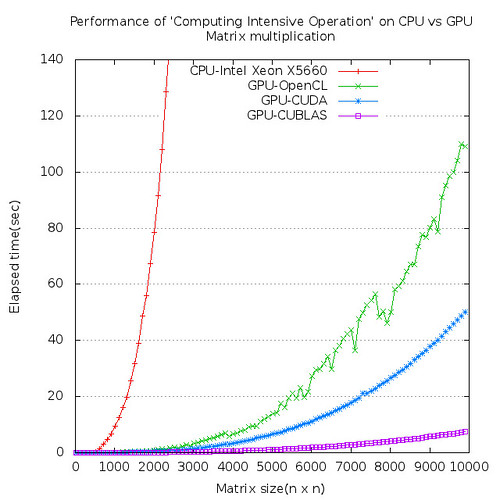
Figure 3. GPU is extremely faster than CPU for matrix multiplication

Most of times are consumed for computations and data transfer time is almost negligible for matrix multiplication on GPU.

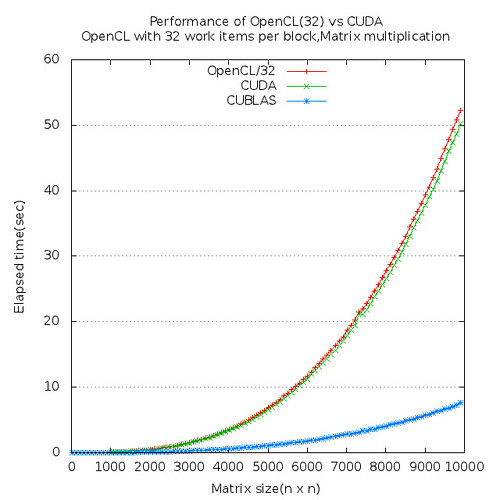
Figure 4. Elapsed time per function on GPU

2. Is OpenCL better than CUDA?

Yes for compatibility

??? for performance

CUDA is about 5% faster than OpenCL for matrix multiplication in this experiment on NVIDIA M2050 platform.
Conclusion

To be able to get maximum performance out of NVIDIA GPU, try to take advantage of CUBLAS as much as possible. If there is any chance that your program need to be running on different GPU platform such as AMD or INTEL, etc, then use OpenCL for compatibility.

If you are interested in full article about this experiment, check here.


Thursday, May 13, 2010

Quick install guide for LAMMPS on Linux cluster

This is a quick installation guide for LAMMS 10 May 2010 version for Linux cluster and it can be done within 1 hours if you follow this carefully.

SYSTEM SPECIFICATION

Intel(R) Xeon(R) CPU X5560 @ 2.80GHz
Red Hat Enterprise Linux Server release 5.4 (Tikanga) 2.6.18-164.11.1.el5
Intel compiler and MPI stack
mpiicc for the Intel(R) MPI Library 4.0 for Linux*
Copyright(C) 2003-2010, Intel Corporation. All rights reserved.
Version 11.1

Prerequisites

Download these 2 files and untar them, respectively.

- fftw-2.1.5.tar.gz
http://www.fftw.org/fftw-2.1.5.tar.gz
- lammps.tar.gz (lib for LAMMPS, LAMMPS itself)
http://lammps.sandia.gov/download.html

Instruction

In a nutshell, installation procedure consists of 3 steps; (1)FFTW, (2)libs for LAMMPS, (3)LAMMPS itself. And if you use mpiicc and mpiifort, then you don't have to worry about the PATH of MPI package and it will be taken care of automatically.

(1)FFTW

Even though the latest version of FFTW is 3.2.2, but, unfortunately, LAMMS can not work with it. You better stick to 2.1.5 for now. And I assume you're installing it at /usr/local/fftw-2.1.5 directory.

After uncompressing it,

cd fftw-2.1.5
./configure CC=mpiicc F77=mpiifort --prefix=/usr/local/fftw-2.1.5
make
make check
make install

(2)libs for LAMMPS

After uncompressing lammps.tar.gz,(actually, libs for LAMMPS is part of lammps.tar.gz)

cd lib/reax
Change ifort to mpiifort in Makefile.ifort
make -f Makefile.ifort

cd lib/meam
Change ifort to mpiifort in Makefile.ifort
make -f Makefile.ifort

cd lib/poems
Change icc to mpiicc in Makefile.icc
make -f Makefile.icc

(3)LAMMPS
cd src

Check which packages are included
make package-status

Choose all standard packages to be included
make yes-standard

If you don't have GPU, then exclude gpu package. Otherwise, you will see tons of error message when you compile it.
make no-gpu

Edit MAKE/Makefile.linux

Remove MPI_PATH,MPI_LIB, it will be taken care of by mpiicc, mpiifort
#MPI_PATH =
#MPI_LIB = -lmpich -lpthread

CC=mpiicc
LINK=mpiicc
FFT_INC = -I/usr/local/fftw-2.1.5/include -DFFT_FFTW
FFT_PATH = -L/usr/local/fftw-2.1.5/lib
FFT_LIB = -lfftw

Build LAMMPS as an executable and library as well

make linux
make makelib
make -f Makefile.lib linux

INSTALLATION

I assume you're installing lammps at /usr/local/lammps directory.

copy bench/ doc/ examples/ potentials/ README tools/ to /usr/local/lammps
copy all *.a to /usr/local/lammps/lib
copy lmp_linux to /usr/local/lammps/bin

Done!!!

Once you have gotten this far, just let user know lammps is available at /usr/local/lammps, then they know how to play around it.